Definition: A computer 1.
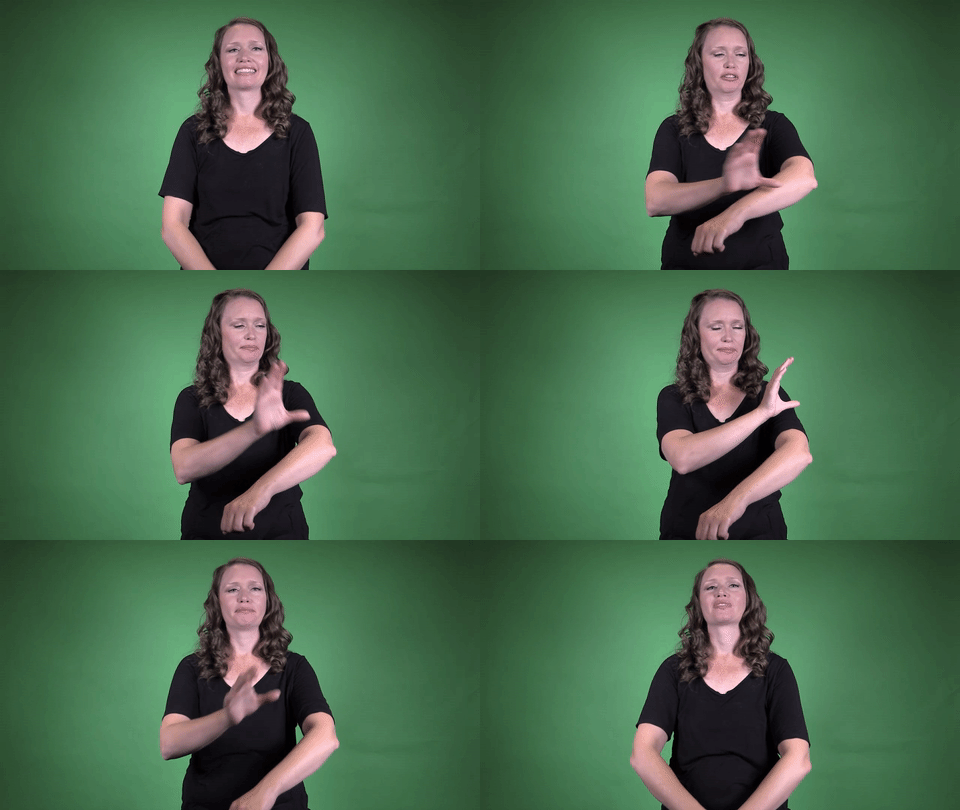
Sign for COMPUTER 1 in ASL

Practice Activities:
Start practicing the sign for COMPUTER 1 in ASL by isolating the movement and repeating it several times while watching yourself in a mirror. Focus on maintaining clear handshape and movement, especially the repeated small circular motion near the dominant side of the forehead. Try signing it slowly at first, then gradually increase your speed while keeping the sign precise.
Practice fingerspelling related tech terms like “email,” “keyboard,” and “monitor,” then follow with the sign for COMPUTER 1 in ASL to form short phrases. For example, fingerspell “email” and then sign “COMPUTER” to build context. This helps make the transition from spelling to conceptual signing smoother.
Create simple sentences using the sign for COMPUTER 1 in ASL such as “I USE COMPUTER EVERY DAY” or “MY COMPUTER IS NEW.” Repeat these sentences using different subjects and adjectives to expand your vocabulary. You can also sign ideas like “COMPUTER BROKE,” “COMPUTER FAST,” or “COMPUTER OLD” to reinforce usage in different contexts.
Storytelling is a great way to build fluency. Develop a short story about going to school and using a computer in class. Describe what kind of computer it is, what you do with it, and how it helps you learn. Use the sign for COMPUTER 1 in ASL several times throughout your story.
Pair up with a partner and alternate asking and answering questions. Sign, “DO YOU HAVE COMPUTER?” or “WHAT COLOR COMPUTER YOU HAVE?” and respond with full signed sentences. This back-and-forth practice builds confidence using the sign in everyday conversation.
Explore technology vocabulary further by creating flashcards of common tech terms with both the ASL sign and English word. Review them daily and include the sign for COMPUTER 1 in ASL often. Integrating the term in multiple activities will deepen recall and fluency.
Cultural Context:
The sign for COMPUTER 1 in ASL reflects how American Sign Language has adapted to the digital age. As technology continues to evolve, Deaf culture embraces these changes by incorporating modern concepts into everyday communication. This sign is widely recognized in Deaf communities across North America.
The sign for COMPUTER 1 in ASL typically uses a specific handshape and movement that mirrors the interaction with a physical or digital machine. The motion used in this sign mimics typing or engaging with a computer screen, which connects language and experience meaningfully. Visual metaphors are a core part of how ASL translates modern life.
In Deaf culture, using the correct sign variation is essential for clarity and cultural respect. Each version, including the sign for COMPUTER 1 in ASL, plays a role in how technology is represented and discussed. It’s common to see students and professionals in the Deaf community using this sign in both educational and workplace settings.
Technology terms in ASL, like the sign for COMPUTER 1 in ASL, often evolve as technology itself changes. Earlier versions of this sign might have referred to large desktop systems, but today it also covers laptops, tablets, and even mobile computing. The versatility of this sign represents the everyday reliance on digital communication and tools.
Tech-related signs are frequently taught in classrooms for Deaf students, and the sign for COMPUTER 1 in ASL becomes one of the foundational vocabulary terms in those settings. Teachers often pair signs with real-world applications during lessons, which helps reinforce how language connects with lived experience. Many Deaf children grow up fluent in these types of signs as part of their standard learning.
The internet and digital media have created new spaces for ASL users to share and learn signs, and signs like the sign for COMPUTER 1 in ASL are frequently featured in virtual lessons and social videos. The spread of ASL through online platforms has helped standardize many tech-related signs across different regions. This process strengthens community and mutual understanding.
In social spaces, particularly Deaf online communities, the sign for COMPUTER 1 in ASL is used in conversations about gaming, social media, email, and computer programming. These uses reinforce the importance of recognizing the visual and functional role of technology in Deaf lives. Knowing the proper version of this sign improves communication and honors cultural norms.
Because ASL is a dynamic and living language, signs like the one for COMPUTER 1 in ASL may vary slightly regionally or evolve over time. However, the version presented here is one of the most commonly accepted in
Extended Definition:
The sign for computer 1 in ASL is a commonly used variation in American Sign Language, especially among younger users and in educational settings. This version uses a simple, clear motion to represent the idea of a computer, making it an easy sign for beginners and fluent signers alike.
To perform the sign for computer 1 in ASL, start with your dominant hand in a “C” handshape. Move the hand in a small circular motion next to the side of your head, typically near the temple. This gesture mimics where the brain is located and symbolizes computing or thinking, which ties directly to the word computer.
This version is one of several used to sign “computer” in ASL, but the sign for computer 1 in ASL remains widely recognized due to its straightforward association with cognitive processing. It is sometimes used in classrooms, especially when teaching children or introducing basic technology vocabulary. You’ll often see teachers and interpreters use this version in elementary or early education environments.
In more technical or workplace settings, other versions of the sign may be preferred. However, the sign for computer 1 in ASL still holds value because of its simplicity and easy-to-remember motion. Many people feel that it naturally represents the concept of a computer, linking the brain’s ability to compute with the function of the device.
Understanding different sign variations enriches your ability to communicate accurately in ASL. The sign for computer 1 in ASL exemplifies how regional and contextual influences shape the way signs are used and understood. Although more formal signs might reference the physical object, this version emphasizes the function or mental concept behind computing.
When watching ASL videos or interacting in deaf spaces, you might notice this version used among students or in informal dialogues. Its appeal lies in its quick, intuitive gesture. Still, it’s always helpful to be aware of the regional signs in the area where you’re signing.
Learning the sign for computer 1 in ASL is important for learners who want to build vocabulary around technology. As computers play a central role in daily communication, education, and work, knowing how to express this word clearly is essential. This version of the sign helps learners make that connection between technology and cognitive processes.
In ASL culture, different versions of signs can reflect generational preferences. Older generations may use a different form, but the sign for computer 1 in ASL continues to gain popularity among younger signers and educational interpreters. The sign’s simplicity ensures it stays accessible to learners
Synonyms: computer, device, PC, machine, processor
Educational resources: Find related learning materials in our course bank!
Want more? Check out some of our popular learning activities on the homepage!
Need to look up a sign? Use our highly rated dictionary: https://aslinteractive.com/best-asl-dictionary/
Follow us on tiktok: https://www.tiktok.com/@aslinteractive. More social media links at the bottom of this page!
Long-tail Keywords: what is the sign for computer in ASL, how do you sign computer in American Sign Language, learn the ASL sign for computer
Categories:
tags: Technology, Objects in the Classroom, Language Learning, Everyday Activities, College/Universities/Schools
Parameters
*Handshape*:
The handshape for the sign for COMPUTER 1 in ASL typically uses a C-handshape, where the fingers and thumb form the shape of the letter “C.” This C-handshape is dominant and refers visually and conceptually to the word “computer.”
To sign the sign for COMPUTER 1 in ASL, the signer moves the C-handshape in a circular motion around the side of the forehead. This movement mimics the placement and function of a computer’s processor near the brain .
*Palm Orientation*:
For the sign for COMPUTER 1 in ASL, the palm orientation typically faces downward or inward toward the body, depending on the variant used. When using the C-hand that circles the forearm, the palm remains mostly down as the hand moves in a small circular motion.
Another version of the sign for COMPUTER 1 in ASL uses both middle fingers tapping the sides of the forehead, with palms facing inward. This orientation supports the concept of computing or processing internally .
*Location*:
The sign for COMPUTER 1 in ASL is located primarily at the side of the head, near the temple. The dominant hand makes a loose “C” handshape, and the fingertips tap or circle slightly on the side of the forehead.
This location symbolizes the connection between computing and thinking, linking it to the brain. When learning the sign for COMPUTER 1 in ASL, it’s important to maintain the location above the cheekbone, ensuring clarity and accuracy.
*Movement*:
The sign for COMPUTER 1 in ASL involves the dominant hand shaped in a loose “C” moving in a small circular motion on the forearm of the non-dominant arm. The palm of the dominant hand faces inward as it circles near the top of the forearm, mimicking the idea of a device interface.
This motion symbolizes the technological function of a computer. The sign for COMPUTER 1 in ASL emphasizes repetitive motion to show the idea of computation or processing ️.
*Non-Manual Signals*:
When demonstrating the sign for COMPUTER 1 in ASL, maintain a focused and neutral facial expression, as the concept is typically conveyed in an objective tone. Slight brow tension may occur for emphasis if contextualizing a description or distinguishing between types of technology . Head movements should be still, unless referencing placement or comparison in a conversation about the sign for COMPUTER 1 in ASL.
Your posture should remain steady to direct attention to the handshape and motion. Eye gaze should follow the dominant hand as it traces the arc over the forearm, enhancing clarity when explaining the sign for COMPUTER 1 in ASL in a teaching or interpretive setting.
*Prosody, Dominant/Non-Dominant Hand*:
The sign for COMPUTER 1 in ASL uses the dominant hand in a loose curved “C” handshape. The dominant “C” hand circles on the upper forearm of the non-dominant arm, which typically rests in front of the torso palm-down. This circular motion mimics the motion of computer processing or data movement .
In the sign for COMPUTER 1 in ASL, the non-dominant hand remains stationary and flat, providing a base for the movement. The dominant hand performs the action, which stays close to the body and uses small, controlled circular motions.
Tips for Beginners:
When learning the sign for COMPUTER 1 in ASL, it’s important to pay attention to handshape and movement. This specific version uses the dominant hand in a “C” handshape, and it circles backward along the forearm of the non-dominant hand. Consistency in the size and direction of the movement will help ensure the sign is understood correctly.
Beginners often struggle with making the circular motion too large or uneven, which can lead to confusion. Keep the motion smooth and controlled—about the size of an orange. Practicing in front of a mirror or recording yourself can help you check accuracy and build muscle memory .
One key part of mastering the sign for COMPUTER 1 in ASL is understanding when and where to use it. This version is used primarily in educational or formal contexts and may differ slightly by region. Be open to feedback from Deaf signers and be aware of variation in the Deaf community.
Make sure to maintain proper facial expressions and posture while signing. A stiff or overly relaxed body can distract from your message. Keep your shoulders level and your expression neutral unless you’re adding emotion for context .
Using the correct handshapes is crucial. If you’re left-handed, remember to reverse your dominant and non-dominant roles when signing. Always double-check that your hand actually forms a clear “C” rather than defaulting to a loose handshape.
To build fluency with the sign for COMPUTER 1 in ASL, incorporate it into short sentences right away. Practice saying things like “I use my computer every day” in sign, rather than just repeating the word in isolation. This gives you more context and helps you connect signing with real-life usage more naturally.
Sign for COMPUTER 1 in ASL, computer sign in American Sign Language, how to sign computer in ASL, ASL vocabulary for computer, sign language computer term
Connections to Other topics:
The sign for COMPUTER 1 in ASL often uses a C handshape that moves in a small circular motion near the side of the head. This movement and location relate conceptually to ideas like thinking, memory, and processing—just as a computer functions cognitively. Signs for concepts like BRAIN, MIND, and THINK share similar locations near the head, which creates a visual-spatial connection between human and technological cognition.
The sign for COMPUTER 1 in ASL also connects to a broader group of technology-related signs, such as INTERNET, NETWORK, and EMAIL. Many of these signs include circular or flowing motions and use the dominant hand in an active role, emphasizing interaction and connectivity. This helps learners recognize semantic fields within ASL, allowing for more intuitive learning and recall when discussing topics in digital technology or communication.
Compound signs derived from the sign for COMPUTER 1 in ASL include terms like COMPUTER-LAB, COMPUTER-CLASS, or even COMPUTER-GAME. These compounds are typically formed by signing COMPUTER followed by the related concept, such as LAB, CLASS, or GAME. Context helps define meaning, and compound signs or phrases reflect how the core idea of the computer is integrated into areas of learning, entertainment, or work.
Understanding the sign for COMPUTER 1 in ASL also supports learning other digital-age vocabulary, such as SOFTWARE, HARDWARE, and FILE, which are commonly fingerspelled or may use initialized signs. Learners often benefit from grouping these digital terms together because of their shared themes of technology, data, and electronic interaction.
When interpreting or translating, recognizing how the sign for COMPUTER 1 in ASL functions in a sentence helps preserve meaning, particularly in discussions of work, school, or media. This sign, though simple, can act as a foundational block for discussing the broad and ever-evolving world of technology in ASL. ️✨
Summary:
The sign for COMPUTER 1 in ASL is produced by using a “C” handshape that circles next to the side of the head, near the temple. The palm typically faces backward or slightly outward, and the motion is smooth and circular. This sign symbolizes the mental or computational process happening in the brain, equating human cognition with the functions of a computer.
The location of the sign near the head isn’t arbitrary; ASL often places signs connected to thought and processing near the forehead. This aligns with broader linguistic structures in signed languages. The use of the “C” handshape directly relates to the English initial “C” of the word “computer,” a common feature in initialized signs.
Computer technology has deeply influenced deaf culture, particularly in communication access. The sign for COMPUTER 1 in ASL carries not just lexical meaning, but cultural significance tied to the digital era. Computers have enabled access to video chats, captioning, and learning tools that help bridge communication gaps for the Deaf community.
In terms of grammatical usage, the sign for COMPUTER 1 in ASL is a common noun. It can be pluralized by repeating the sign with a horizontal sweep to indicate multiple computers. It can also be modified with classifiers or spatial references to show size, location, or usage type in a sentence.
The development of this sign reflects changes in society as computers became part of everyday life. Earlier signs for similar devices or processes might have looked different or had more in common with typing motions. Now, the sleek, circular gesture near the head reflects a more conceptual approach to computing.
The sign integrates with related vocabulary such as INTERNET, EMAIL, MOUSE, and KEYBOARD. These related signs often mimic the function or visual look of the technology. For example, the sign for MOUSE involves movement over a surface, resembling actual usage.
Linguistically, the sign for COMPUTER 1 in ASL highlights how the language depends on handshape, location, palm orientation, movement, and non-manual markers to create meaning. Here, the “C” handshape and location near the head are both critical parameters that distinguish it from other signs.
Applied linguistics helps us understand how the sign for COMPUTER 1 in ASL is acquired and used in real-life contexts. For signers learning new technological vocabulary, iconic and initialized signs are often absorbed quickly due to their intuitive form. This makes signs like COMPUTER 1 efficient for communication and educational purposes.
Syntax in ASL places the noun like computer either at the beginning or end of a sentence depending on emphasis. A signer might introduce COMPUTER 1 first and then set up a classifier to describe its function or state. For example, “COMPUTER 1, ME USE DAILY” creates a clear context.
From a sociolinguistic view, this sign reflects the close tie between Deaf culture and digital communication. The Deaf community was among the early adopters of visual tech, making the sign for COMPUTER 1 in ASL not just descriptive but symbolic of empowerment and access.
The sign does not require exaggerated facial expressions unless being used in contrastive or rhetorical formats. Facial expressions can add clarity, such as squinting to emphasize size (like laptop versus desktop) or raising eyebrows for a rhetorical question.
Some signers may choose fingerspelling (C-O-M-P-U-T-E-R) when talking to non-native signers or in specific contexts such as interpreting English exactly. However, everyday conversation among fluent signers generally prefers the sign for COMPUTER 1 in ASL due to ease and familiarity.
Technological terms in ASL evolve quickly. The sign for COMPUTER 1 in ASL has remained relatively stable, but there may be regional variants or adaptations. Some may make the motion faster, slower, or perform it slightly above the temple instead of to the side.
This diversity in variants echoes the natural linguistic variation found in all languages, including ASL. Factors such as region, age of the signer, first language, and familiarity with tech culture can all affect which variant a person uses. These factors help shape the landscape of ASL vocabulary.
The sign’s circular motion implies thought processing or cycles, resembling how computers handle data. This metaphorical language use is common in ASL, where visual and conceptual metaphors help convey abstract terminology.
In educational settings, the sign for COMPUTER 1 in ASL is taught early due to its relevance to classroom technology. Whether discussing coding, research, or internet access, students need this sign to navigate tech-based learning environments in ASL contexts.
The sign often appears in discussions of science, technology, engineering, and mathematics (STEM) topics within the Deaf education movement. Incorporating tech vocabulary such as COMPUTER 1 supports bilingual and bicultural education goals in deaf schools.
Performing the sign with accuracy is important in avoiding confusion with other head-location signs. For instance, signs like THINK or IDEA also occur near the forehead, but differ in handshape or movement, making them distinct from
Want more? Check out some of our popular learning activities!
ASL Interactive Resources
ASLInteractive YouTube Channel
Follow us on tiktok: @aslinteractive.com
Follow us on Instagram: aslinteractive
Facebook page: aslinteractive
Facebook group: aslinteractive
LInkedIn: ASL Interactive LLC
Twitter: @ASL_interactive
*Some information on this page is AI-generated. AI can make mistakes. Please check the information.
Responses