Definition: A computer 2.
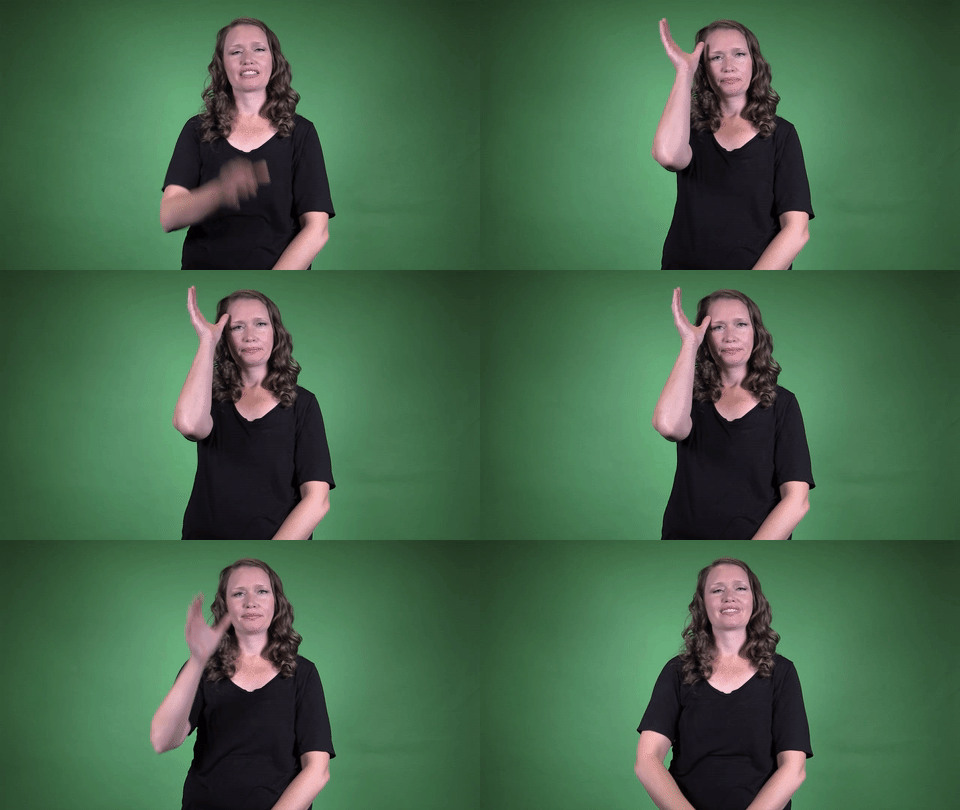
Sign for COMPUTER 2 in ASL

Practice Activities:
To practice the sign for COMPUTER 2 in ASL, begin by standing in front of a mirror and repeating the sign ten times. Pay close attention to your handshape and movement. Make sure you’re placing your dominant hand in a C handshape and moving it in small upward circular motions on the passive arm, following the correct motion used in COMPUTER 2.
Use the sign for COMPUTER 2 in ASL within familiar phrases like “I use my computer every day” or “My computer is on the table.” Practice signing these sentences slowly at first, then increase your speed as you become more confident. Record yourself and compare your movement and expression with model signers in videos.
Try a timed drill where you switch between related vocabulary like COMPUTER, INTERNET, EMAIL, and TYPING. This helps build fluency and supports quick recognition. Pair with a classmate or friend and take turns signing a sentence using one or more signs, then guess the meaning. Turn it into a game where the goal is to include the sign for COMPUTER 2 in ASL in each round.
Create a short story or daily routine that involves computer use, such as doing homework or watching a movie. Incorporate the sign for COMPUTER 2 in ASL multiple times within the narrative, paying attention to consistency and clarity. For example, “Today I woke up, made coffee, and sat at my computer to start work.”
Watch brief ASL dialogues or vlogs with tech topics and identify whenever the sign for COMPUTER 2 in ASL is used. Mimic what you see and practice along. Focus on your facial expressions as well as your signing for full communication. Use emojis like and during practice to identify sign cues and keep your sessions engaging.
Cultural Context:
In American Sign Language, the sign for COMPUTER 2 in ASL reflects both cultural values and technological evolution. Deaf culture emphasizes visual language and spatial awareness, making signs for modern technologies particularly meaningful. The way the sign for COMPUTER 2 in ASL is formed connects with the community’s focus on clarity, accessibility, and ease of communication.
The sign for COMPUTER 2 in ASL is one of a few variations used across regions and age groups. While the first version of the sign captures the general concept of a computer device, COMPUTER 2 in ASL tends to be more specific in certain areas or settings. It demonstrates how ASL adapts and evolves to capture new technology in culturally appropriate ways.
Technology plays a significant role in the Deaf community, especially when it comes to communication and access. Tools like computers, smartphones, and video calls help bridge the gap between the Deaf and hearing worlds. So, a sign like COMPUTER 2 in ASL carries more than just a meaning—it reflects an integration of digital tools into everyday life.
The development of the sign for COMPUTER 2 in ASL also speaks to shared experiences in learning and using technology. In Deaf education, schools often incorporate technology to enhance language acquisition and promote independent learning. As a result, signs for devices such as COMPUTER 2 in ASL have become a core part of classroom vocabulary and social communication.
Variations of signs often arise in ASL due to regional usage, generational differences, or personal preferences. COMPUTER 2 in ASL may be viewed more commonly in academic or tech-savvy communities, where alternative signs are encouraged for specificity. For learners and educators, using COMPUTER 2 in ASL offers a way to build more nuanced vocabulary.
Cultural identity within the Deaf community is expressed through sign choices and usage. Choosing to use COMPUTER 2 in ASL may signify alignment with certain cultural norms or educational practices. It’s not just a word—it’s a small piece of how Deaf people see themselves in a rapidly changing world.
This sign is also relevant in the context of media and entertainment. With an increasing number of news outlets, educational series, and online tutorials incorporating ASL, signs like COMPUTER 2 in ASL are used to relay tech concepts clearly and visually. It ensures full participation, not just access.
In social and professional settings, knowing and using COMPUTER 2 in ASL signals technological fluency and cultural awareness. It shows that the signer is keeping up with digital changes while maintaining authentic ASL usage
Extended Definition:
The sign for COMPUTER 2 in ASL is a specific variation used in American Sign Language to refer to the word “computer.” This version may differ slightly from the more widely used or traditional sign, reflecting either a regional, generational, or contextual preference. Learners may encounter this version depending on the area or Deaf community they engage with.
To produce the sign for COMPUTER 2 in ASL, one typically uses the dominant hand to make a circular motion near the head, often in a repeated pattern. This movement might resemble the motion of a hard drive or circuit, symbolizing the process or function of computing. It represents the abstract concept of processing or thinking, linked to how computers work.
This variation of the sign for computer connects directly with technology and how people interact with devices on a daily basis. It’s important to note that different ASL users may use different signs for the same word, so exposure to multiple versions, like the sign for COMPUTER 2 in ASL, helps develop more flexible and fluent communication skills.
In classrooms and educational settings, ASL instructors might introduce the sign for COMPUTER 2 to show students how language evolves and changes based on societal use. Technology-related signs often evolve rapidly due to the fast pace of innovation. As a result, newer signs or less conventional versions, like COMPUTER 2, become more common or continue alongside traditional signs.
Understanding the sign for COMPUTER 2 in ASL can help deepen knowledge of both vocabulary and context. In some Deaf communities, using this version helps identify certain age groups or educational backgrounds. For ASL learners, it’s essential to recognize and adapt to these linguistic nuances.
Children learning American Sign Language might be introduced to the sign for COMPUTER 2 in ASL when discussing technology, electronics, or schoolwork. Since computers are such a central part of learning environments today, this sign is especially relevant for younger ASL users. Integrating this sign into conversations makes technology-based lessons more accessible and engaging.
Using the sign for COMPUTER 2 in ASL during casual conversations about gadgets, work, or school demonstrates broader ASL vocabulary and understanding. With the increasing reliance on laptops, tablets, and digital tools, signs like this one are widely used across various discussions. It also reflects how sign language adapts to modern needs.
On social media and in online video content presented in ASL, users may choose to use the sign for COMPUTER 2 in ASL to describe working from home, gaming, programming, or studying. It
Synonyms: PC, personal computer, desktop, laptop, workstation
Educational resources: Find related learning materials in our course bank!
Want more? Check out some of our popular learning activities on the homepage!
Need to look up a sign? Use our highly rated dictionary: https://aslinteractive.com/best-asl-dictionary/
Follow us on tiktok: https://www.tiktok.com/@aslinteractive. More social media links at the bottom of this page!
Long-tail Keywords: what is the sign for computer in asl, how do you sign computer in american sign language, asl sign for computer
Categories:
tags: computer in American Sign Language, how to sign computer in ASL, ASL dictionary computer, learn ASL computer sign, computer 2 ASL meaning
Parameters
*Handshape*:
The handshape used in the sign for COMPUTER 2 in ASL typically involves a loose “C” hand. The dominant hand forms the “C” shape and moves in a circular motion near the side of the head, symbolizing the brain or processing center—key to a computer’s function.
This curved, open handshape is essential for clearly expressing the sign for COMPUTER 2 in ASL. It mimics a computing action and helps differentiate it from similar signs. ️
*Palm Orientation*:
The palm orientation for the sign for COMPUTER 2 in ASL typically faces the side with the dominant hand. The dominant hand, shaped like a bent “C” or open “5” depending on the variation, circles along the arm or lightly taps the forearm near the elbow. ✋
When performing the sign for COMPUTER 2 in ASL, it’s important to keep the palm slightly inward or downward to follow the motion comfortably and naturally. This palm orientation helps reinforce the concept of technology and movement associated with computers.
*Location*:
The sign for COMPUTER 2 in ASL is typically made at the side of the dominant arm, specifically near the upper arm or shoulder area. The movement often involves a loose “C” handshape that taps or brushes up the arm in a circular motion.
This specific location emphasizes the association with the machine or hardware, which helps differentiate the sign for COMPUTER 2 in ASL from other tech-related signs. Make sure your arm remains relaxed while maintaining clarity in the handshape and placement.
*Movement*:
To produce the sign for COMPUTER 2 in ASL, shape your dominant hand into the C handshape. Starting near the side of your head, circle the C around the back of your head and bring it forward again in a small circular motion.
This sign mimics the traditional head-based reference for older computer systems. The movement is fluid and should stay close to the side or back of the head. The Sign for COMPUTER 2 in ASL emphasizes where early computers were often worn or interfaced, connecting the gesture with its meaning. ️
*Non-Manual Signals*:
When performing the sign for COMPUTER 2 in ASL, maintain a neutral facial expression or show slight focus, which helps reinforce the concept of using or interacting with technology. Your eyes should follow the movement of your dominant hand, especially if the sign involves movement near the wrist or forearm.
The sign for COMPUTER 2 in ASL may also include a subtle forward head tilt or raised eyebrows to clarify the object being referenced. These non-manual cues provide important context, especially when differentiating versions of signs.
*Prosody, Dominant/Non-Dominant Hand*:
The sign for COMPUTER 2 in ASL uses a dominant hand in the C-handshape, moving in small, circular motions against the side of the forehead above the temple. The non-dominant hand stays neutral or relaxed at the side of the body. This version of the sign for COMPUTER 2 in ASL reflects the function of the brain, symbolizing computing or processing information . Be sure facial expressions match the context when using it in conversation.
Tips for Beginners:
Mastering the sign for COMPUTER 2 in ASL takes observation and mindful hand placement. This variation of the sign typically uses a dominant “C” handshape that passes up the inside of the nondominant forearm in a quick, upward motion. When learning this, try practicing in front of a mirror to ensure the handshape stays clear and forms a smooth vertical path along the arm.
A common beginner mistake is not maintaining a consistent “C” shape or slapping the arm rather than brushing it. Keep the movement light but deliberate, maintaining contact along the inside of your forearm. If your handshape collapses into something less defined, it could change the meaning or cause confusion.
Facial expressions aren’t as essential with this particular sign, but maintaining a neutral or focused look helps reinforce your clarity and confidence. Try practicing the sign for COMPUTER 2 in ASL slowly at first, then gradually increase your speed once your movement becomes more natural. Avoid rushing to complete the sign quickly, as speed can compromise clarity.
Repetition is one of the best tools for improving fluency. Use the sign for COMPUTER 2 in ASL in small daily routines—perhaps when talking about using your computer, work, or tech-related conversations. The more often it comes up in context, the quicker it will become automatic.
If you’re unsure whether you’re performing the sign correctly, refer to videos from reliable sources or consult with a fluent signer. A language partner or teacher can help catch small errors and give live feedback. Start slow, be patient, and remember that signing takes time to master .
Keep your non-dominant arm steady and in a natural position. Keeping alignment and body posture in check enhances the precision of the sign and helps communicate your intent clearly in any context where you use the sign for COMPUTER 2 in ASL.
Connections to Other topics:
The sign for COMPUTER 2 in ASL connects closely to a range of technology-related signs, such as INTERNET, EMAIL, and TYPING. These concepts often share similar handshapes or movement locations related to the head and torso, revealing patterns in how ASL maps modern ideas onto physical space. Since many tech concepts are relatively new, their signs tend to use metaphor or mimetic motion to convey meaning.
Common compound signs involving the sign for COMPUTER 2 in ASL include COMPUTER-LAB, COMPUTER-CLASS, and COMPUTER-SCIENCE. These compound signs are framed by context and can adapt based on setting. For example, COMPUTER-CLASS may use the class sign with a head-nodding gesture to suggest a specific learning environment centered around computers.
This variation of the computer sign also shares roots with cognitive-related signs like THINK and REMEMBER. The location by the forehead in some variations of COMPUTER emphasizes the link between mental processing and digital computing. This visually reinforces the metaphor of the brain as a computer, a connection often seen in ASL’s structured use of space and motion.
In educational and professional settings, the sign for COMPUTER 2 in ASL may blend into phrases like COMPUTER-SKILLS or COMPUTER-WORK. These expressions are useful when discussing resumes, job interviews, or school subjects. Learners developing vocabulary around employment or academics will encounter the sign regularly alongside terms like TECHNOLOGY, OFFICE, and PROGRAMMER.
Another useful connection is with signs such as LAPTOP and MONITOR, which build off understanding the base concept of COMPUTER. By recognizing how signs like COMPUTER 2 expand into more specific terms, students can develop a richer semantic network in ASL. It also helps bridge understanding between fingerspelled tech terms and more standardized visual representations in sign.
Understanding the sign for COMPUTER 2 in ASL also supports fluency in describing everyday activities, like using apps, websites, or digital tools. Whether discussing virtual meetings via VIDEO-CALL or creative tasks like COMPUTER-ART, the sign opens doors to more nuanced digital conversations.
Summary:
The sign for COMPUTER 2 in ASL reflects evolving technology and the way Deaf culture adapts to modern tools. This particular version often mimics the motion of typing or mirrors the functional components of a computer, such as the CPU or keyboard.
To produce the sign for COMPUTER 2 in ASL, one common method involves using the dominant hand to “tap” or “swipe” the non-dominant arm, wrist or even represent circuits, depending on regional or community-based variations. The gesture often emulates the shape or movement associated with computers, allowing for intuitive visual mapping.
This variation differs slightly from other signs for computer by emphasizing one specific visual metaphor. Sometimes the sign incorporates C-handshapes tapping or circling on the forearm, representing how technology interfaces with human contact.
The variation in the sign for COMPUTER 2 in ASL shows how signers reinterpret traditional signs based on familiarity with new technological items. For example, older signs might resemble a typewriter, while modern users may lean toward tablet or touchscreen movements.
The cultural significance of the computer in Deaf communities highlights accessibility and connection. Computers enable video calls, instant messaging, closed captioning, and visual resources, which serve as lifelines for users who rely on visual communication.
The sign serves not just as a linguistic item but as an entry point into multifaceted digital access. The ability to communicate online via computer-related technology adds incredible value to the Deaf community’s social and educational lives.
From a grammatical standpoint, the sign for COMPUTER 2 in ASL can stand alone as a noun but also works seamlessly alongside classifiers and descriptive verbs. For instance, adding the sign for USE or TYPE after the noun allows for complex sentence structures rooted in visual grammar.
This gesture’s spatial orientation can change depending on context. When narrating or storytelling in ASL, signers may tilt or direct the sign to imply location, ownership, or interaction with imaginary interfaces in ASL’s physical signing space.
Linguistically, this sign is iconic—it relates visually to the object it represents. Iconicity is a key feature of signs in ASL, providing immediate clues to meaning even for novice users or children learning the language.
Unlike abstract signs, the sign for COMPUTER 2 in ASL benefits from easy acquisition due to its mimetic quality. Learners can quickly associate the motion with the device, reducing the cognitive gap between the concept and its sign.
Regional dialects play a role in the sign’s presentation. In some Deaf communities, alternate forms may use different handshapes such as the C, S, or modified claw hand, reflecting localization and historical exposure to certain computer forms.
These differences signpost regional exposure to technology. For example, Deaf individuals frequently working with hardware might adopt a more component-focused version of the sign for COMPUTER 2 in ASL.
Related signs include LAPTOP, KEYBOARD, TYPE, and INTERNET. Often these terms are built off the same root sign or are visually similar to maintain semantic cohesion in technology-related lexicons.
The sign for COMPUTER 2 in ASL may also toggle between being a base sign and a compound element. For instance, combining it with SIGNS like WORK or SETUP forms more nuanced tech expressions like COMPUTER WORKSTATION or COMPUTER INSTALLATION.
In narratives, the sign is key for setting. When sharing a story involving remote learning or online work meetings, the sign acts as a visual signal of modern life and its technological backdrop.
From an applied linguistics angle, the sign is a prime example of the evolving nature of ASL lexicons. As new technology emerges, the ASL community continuously adapts, creating or modifying signs to suit new concepts.
These innovations emerge organically, usually through collective agreement in social settings or educational institutions. The sign for COMPUTER 2 in ASL has been influenced by students, teachers, and professionals immersed in tech-heavy environments.
Deaf developers and computer scientists may promote specific variants depending on the context. This gives rise to workplace jargon that filters into general usage with time.
The influence of English is another factor. While ASL is its own language, lexical borrowings and conceptual parallels often arise, especially when dealing with technical terminology like server, modem, or app.
Code-switching between ASL and fingerspelling also happens. If a particular term associated with the sign for COMPUTER 2 in ASL lacks a unique sign, users may simply fingerspell the term or combine it with contextual classifiers.
ASL classifiers can flesh out the sign’s interaction with surrounding objects. For example, a signer might use a flat hand to represent a desk and then place the sign for computer on top, illustrating setup and spatial placement.
This three-dimensional quality shines in educational contexts. Deaf educators use dynamic sign sequences to explain how networks or hardware systems function, anchored by the sign for COMPUTER 2 in ASL.
Digital storytelling in ASL also makes heavy use of this sign. Children’s stories, webcomics in sign, and visual narratives often include
Want more? Check out some of our popular learning activities!
ASL Interactive Resources
ASLInteractive YouTube Channel
Follow us on tiktok: @aslinteractive.com
Follow us on Instagram: aslinteractive
Facebook page: aslinteractive
Facebook group: aslinteractive
LInkedIn: ASL Interactive LLC
Twitter: @ASL_interactive
*Some information on this page is AI-generated. AI can make mistakes. Please check the information.
Responses