Sign for COMPUTER in ASL | 💻 ASL Dictionary

Definition: A computer.

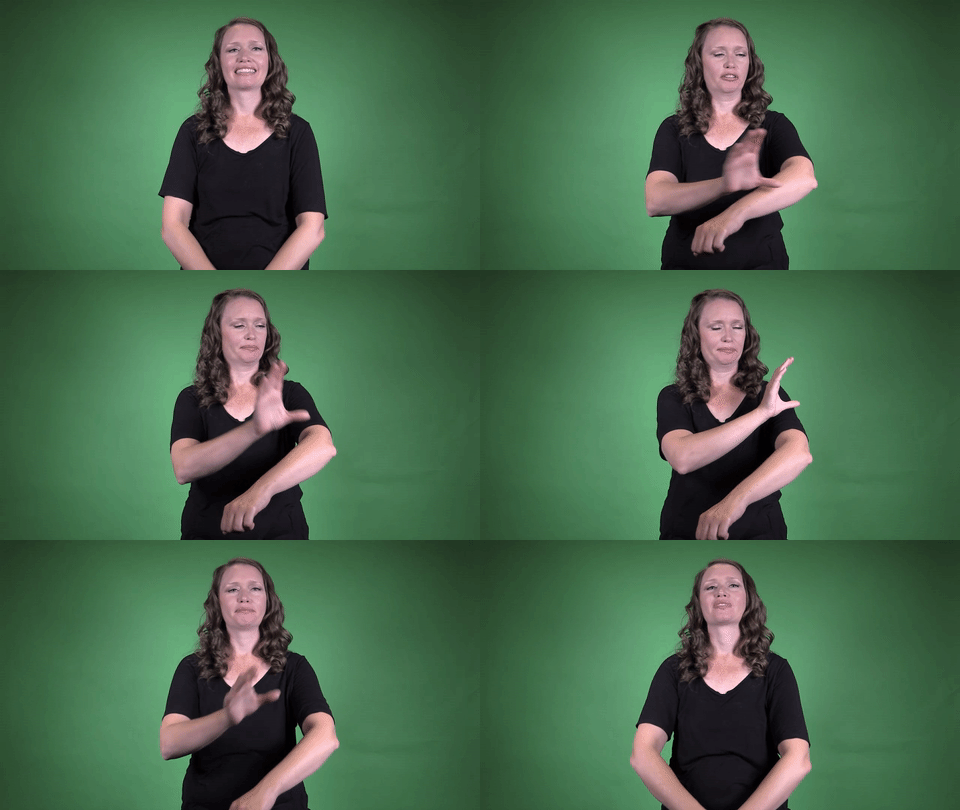
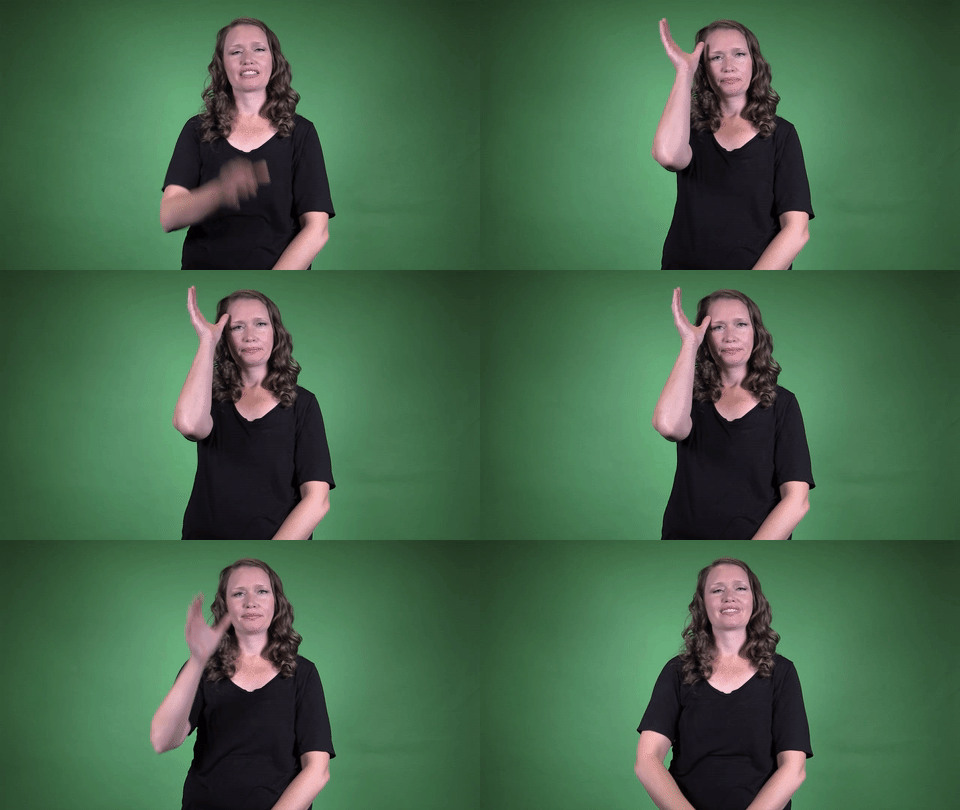
Sign for COMPUTER in ASL

YouTube player

Practice Activities:

Start by practicing the sign for COMPUTER in ASL in isolation. Stand in front of a mirror and repeat the sign slowly and clearly about 10 times, focusing on correct handshape and location. Then, switch hands if you’re practicing ambidexterity and try the sign again to build fluency.

Once the sign in isolation feels natural, try incorporating it into simple phrases. Practice sentences like “I use a computer,” “Computer class is fun,” and “My computer is new.” Sign these phrases slowly, then try increasing your speed as accuracy improves. Record yourself and check handshape and movement to ensure you’re maintaining clarity.

Work with a friend or ASL partner by creating short dialogues that include the sign for COMPUTER in ASL. Take turns asking and answering questions such as, “Do you have a computer?” or “How often do you use your computer?” This helps contextualize the vocabulary and builds conversational confidence.

Create a storytelling prompt focused on technology. A sample story might be: “You are starting a new job that requires a lot of computer work.” Use this prompt to build a short narrative that includes multiple uses of the sign for COMPUTER in ASL, along with other related signs like WORK, TYPE, EMAIL, and OFFICE.

Label objects around your home or classroom with reminders to sign their ASL equivalents when seen. Place a sticky note on your computer that says “sign me!” to prompt regular practice throughout the day.

Use online videos or ASL dictionaries to watch multiple people perform the sign for COMPUTER in ASL. Observe regional variations if available, and try mimicking them to increase your receptive skills. Try signing computer-related vocabulary in sequence, like MONITOR, KEYBOARD, COMPUTER, and MOUSE, to reinforce the connection of signs in theme-based practice.

Cultural Context:

The sign for computer in ASL has evolved over time, reflecting both cultural changes and technological advancements. In the early days of computing, this sign was more focused on the idea of calculation and machinery. As personal computers became more common, the ASL sign adapted to better represent modern technology and how people interact with it today.

In Deaf culture, the sign for computer in ASL is more than just a reference to a device. It symbolizes connection, information access, and inclusion within the digital world. The Deaf community often uses computers for video communication, education, and work, making the concept deeply important in everyday life.

ASL is a visual and spatial language, and the sign for computer in ASL often includes signs representing its use on a desk or with a keyboard and screen. These visual cues help ASL users quickly understand the context in which the computer is being used. The sign may vary slightly depending on regional usage or the age of the signer.

Technology is a major part of communication in the Deaf community, so understanding the sign for computer in ASL helps bridge gaps between tech-world terms and real-life usage. The widespread use of video calls, for example, relies on computers, making this sign essential in discussing daily routines. Many Deaf professionals and students use the sign frequently when describing their tools for work and learning.

The importance of the sign for computer in ASL also appears when teaching digital literacy to Deaf children and teens. Learning to sign words like computer allows young signers to express themselves in discussions about school assignments, games, and digital tools. As a result, the sign for computer in ASL supports educational access and language development.

Culture also influences how tech signs are introduced and shared. When a new device or term emerges, the Deaf community often collaborates on an appropriate ASL sign. The sign for computer in ASL has stabilized over time, but it still reflects the creativity and resourcefulness of Deaf culture in incorporating new ideas.

In everyday conversations about online browsing, programming, or gaming, the sign for computer in ASL shows up often. It plays a central role in conversations that involve using technology for entertainment or connection. As digital culture expands, the sign for computer in ASL remains relevant and frequently used.

Deaf content creators, streamers, and educators often rely on the sign for computer in ASL as they share information through videos and social media. This sign creates clarity in their presentations and helps viewers easily follow along with tech-related topics. The ASL

Extended Definition:

The sign for computer in ASL is commonly taught in ASL classes and used frequently in everyday signing. As technology plays a big role in modern life, knowing how to sign computer in ASL helps improve communication in both casual and professional settings. Whether you’re talking about a personal laptop or a desktop at the office, this sign is a useful addition to your ASL vocabulary.

The most accepted sign for computer in ASL is made by forming the dominant hand into a C shape and tapping it at the side or back of the head. Some signers may use a version that includes a circular motion near the temple or down the arm, depending on the region or personal habit. Like many signs, the sign for computer in ASL can differ slightly based on where you are in the United States or based on the context in which it’s used.

In classroom settings, students often use the sign for computer in ASL when asking about assignments, discussing tech issues, or referring to online resources. Teachers and interpreters may also use it frequently during lessons that involve digital learning. Since more schools now provide laptops or tablets to students, this sign has become even more common in educational contexts. ‍

In the workplace, the sign for computer in ASL comes up in conversations ranging from tech support requests to daily tasks involving spreadsheets, emails, or video production. Individuals who work in IT, customer service, remote jobs, or office environments use this sign throughout the day. Mastering the sign for computer in ASL is especially important for deaf professionals in tech fields or people communicating with them through interpreters.

When used in casual conversation, this sign helps describe hobbies and interests. People might use the sign for computer in ASL when talking about gaming, coding, or watching YouTube. It’s also helpful when explaining that you’re working from home, attending virtual meetings, or studying online.

Some variations of the sign for computer in ASL include signs used in older ASL dialects or alternative tech-related signs. For instance, before the widespread use of laptops, older ASL users may have used a slightly different motion to indicate large, early computer systems. These historical differences can add meaning depending on the person’s age or background.

The sign for computer in ASL is also commonly seen in interpreted content on the internet, especially in videos about technology. ASL vloggers and educators use this sign when discussing updates in software, tech reviews, or digital accessibility. Including this sign in content

Synonyms: computer, PC, desktop, laptop, workstation

Educational resources: Find related learning materials in our course bank!

Want more? Check out some of our popular learning activities on the homepage!

Need to look up a sign? Use our highly rated dictionary: https://aslinteractive.com/best-asl-dictionary/

Follow us on tiktok: https://www.tiktok.com/@aslinteractive. More social media links at the bottom of this page!

Long-tail Keywords: what is the sign for computer in ASL, how to sign computer in American Sign Language, ASL sign for computer

Categories:

tags: Computer in American Sign Language, ASL sign for computer, how to sign computer in ASL, computer ASL dictionary, technology signs in ASL

Parameters

*Handshape*:

The handshape used in the sign for COMPUTER in ASL typically involves a dominant hand in the C handshape. This hand makes a small circular motion on or near the wrist or forearm of the non-dominant hand, which may be relaxed or remain still.

The C handshape mimics the idea of the letter “C” for “computer,” visually connecting to the device. The sign for COMPUTER in ASL uses this motion to represent the technological essence of a computer .

*Palm Orientation*:

The palm orientation for the sign for COMPUTER in ASL generally involves the dominant hand in a loose C-handshape. The palm faces downward or somewhat toward the body, depending on the variation being used.

In some regional versions of the sign for COMPUTER in ASL, the dominant C hand moves in a circular or tapping motion on the forearm, with the palm still angled slightly toward the arm. Regardless of variation, the palm never faces fully outward.

*Location*:

The sign for computer in ASL is typically produced near the side of the head, indicating the mind or thought process associated with computing. This location reinforces the idea of processing or thinking, aligning with the concept of a computer.

Sometimes, depending on the variation, the sign can also be made near the dominant forearm or along the wrist, mimicking the motion or shape of older computer equipment. No matter the version, the sign for computer in ASL commonly remains close to the body, emphasizing its conceptual link to communication and thought. ️

*Movement*:

The dominant hand forms a bent “C” or claw-handshape and taps or circles lightly against the side or back of the non-dominant forearm. The motion may be a small double tap or a gentle circular motion, depending on the variation used.

The sign for computer in ASL visually represents the old-style computers worn on the arm or the motion of processing. This movement helps reinforce the connection of the sign for computer in ASL to digital or tech-related meanings .

*Non-Manual Signals*:

The non-manual signals for the sign for COMPUTER in ASL typically include a neutral facial expression unless emphasized in contrast or comparison. Some signers may show mild engagement or focus by tightening the lips slightly or raising the eyebrows subtly, especially in educational settings or explanations.

During clear instruction or emphasis, your face should reflect attentiveness or slight concentration . This helps others better understand the context around the sign for COMPUTER in ASL, especially when used in technical conversations or to differentiate among multiple terms.

*Prosody, Dominant/Non-Dominant Hand*:

The sign for COMPUTER in ASL uses the dominant hand to make a loose “C” shape. It circles or taps against the forearm of the non-dominant hand, which remains still. The movement can vary depending on the regional sign. The dominant hand performs the primary motion, symbolizing the action associated with the sign for COMPUTER in ASL. Make sure both hands stay in a comfortable, neutral space in front of your torso.

Tips for Beginners:

When learning the sign for COMPUTER in ASL, one of the best tips is to focus on location and handshape. The dominant hand uses a “C” handshape and moves in a small, quick circle or taps up the forearm of the non-dominant arm, depending on the variation you’re learning. Whichever version you’re using, consistency in your motion and positioning matters for clarity.

Beginners often try to overemphasize the handshape or add unnecessary movement. Keep the motion small and controlled. Exaggerating hand movements can make it harder for others to understand and can lead to confusion with other similar signs.

Another important tip when practicing the sign for COMPUTER in ASL is to remain relaxed. Tension in your hands, arms, or shoulders can make your signing look rigid. A relaxed hand gives your signs a fluid, natural appearance that is easier for others to read.

Use a mirror or video recording to check your form. This allows you to see if your hand is properly shaped and if your motion is smooth. Practicing in front of others or with friends can also help reinforce proper movement and build confidence.

The sign for COMPUTER in ASL can vary slightly depending on the region or age of the person using it. Some people use a tapping motion on the wrist or forearm, while others use the C hand to circle near the side of the head. Recognizing these variations helps improve your understanding and reception of different signing styles over time.

Stay patient with yourself, especially with signs that have multiple acceptable forms. Repetitive practice combined with real-world application will help reinforce the sign for COMPUTER in ASL and lead to better fluency in casual and academic signing environments.

sign for computer in asl, computer sign asl meaning, how to sign computer in american sign language, asl tech vocabulary

Connections to Other topics:

The sign for COMPUTER in ASL naturally connects to a wide range of tech-related vocabulary. It helps build a foundation for learning other digital and internet terms, like LAPTOP, MOUSE, INTERNET, and EMAIL. These signs often incorporate tech-based classifiers or show spatial relationships tied to computer usage.

Understanding the sign for COMPUTER in ASL also supports learning compound signs such as COMPUTER-MOUSE or COMPUTER-PROGRAM. These compound signs reflect not only vocabulary expansion but also how concepts are built logically in ASL. Using the sign for COMPUTER as the base and modifying it helps learners master ASL syntax and semantic structures.

The sign for COMPUTER can relate to educational settings when used with SCHOOL, LEARN, or CLASS. In this context, it could convey the idea of computer classes, online learning, or digital education, depending on the signed phrases. It emphasizes how ASL adapts to evolving topics like virtual schooling and tech literacy.

When combined with work-related signs like WORK, OFFICE, or TYPING, the sign for COMPUTER is essential in workplace discourse. It can construct more complex expressions like COMPUTER-WORK or COMPUTER-JOB, often signed with contextual emphasis or additional classifiers to clarify specifics.

This sign also connects to ASL classifiers used to describe interaction with electronic devices. For instance, CL:1 or CL:5-Flat can show where a computer is placed or that someone is typing rapidly. Learners benefit from using the sign for COMPUTER in ASL as a bridge to understanding space, location, and motion in digital contexts.

The repeated use of the sign for COMPUTER in ASL in daily conversation reinforces its significance in modern communication. As signs evolve with technology, mastering this sign links learners to an expanding digital lexicon in ASL. This reinforces fluency and adaptability in tech-related discussions.

Summary:

The sign for COMPUTER in ASL has evolved over time, reflecting the rapid technological changes in society. Traditionally, one version involved using the dominant C handshape moving in small circles on the forearm or on the back of the non-dominant hand, symbolizing a machine or computing device.

More modern usage shows people adapting the sign by tapping a C handshape on the side of the forehead. This references the mind, often associated with thinking and computation, drawing a metaphor between human cognitive function and computer processing.

The sign for COMPUTER in ASL may vary regionally and contextually, especially between older and younger signers. Some older Deaf community members may still use signs involving mechanical movements recalling early computing machines, while younger users may adopt newer streamlined signs that mirror contemporary tech culture.

It’s essential to understand that the sign for COMPUTER in ASL carries not only a linguistic meaning but also cultural significance. It represents access to technology, education, and communication, particularly important in Deaf culture where such access bridges inclusion.

The evolution of the sign for COMPUTER in ASL also reflects technological accessibility for the Deaf community. From the arrival of text messaging to video relay services, computers and digital communication have revolutionized Deaf connectivity.

In academic ASL linguistics, this sign showcases the intersection between classifiers and symbolic referents. Certain versions of the sign conceptually resemble classifiers for machines, suggesting the computing device’s function or impact.

The classifier-like motions of early signs resemble gears or rotating discs, embodying older technology. That visual cue tied directly to the role of early computers as mechanical machines, defining its original sign framework.

Recently, more abstract versions reflect a shift in how Deaf signers perceive the digital world. The sign moved away from mechanical mimicry and instead becomes more conceptual, like tapping a C on the temple to reflect data processing or mental depth.

This symbolizes ASL’s dynamic nature, always adapting to encompass and represent new ideas. As the concept of computers changes—from desktops to tablets to mobile devices—the sign evolves as well.

There is often some blending with the sign for BRAIN or THINK when signing COMPUTER. This highlights the semantic connection between human cognition and artificial processing, which people are more likely to think of metaphorically.

Grammatically, the sign for COMPUTER in ASL functions as a noun and can be modified according to topic-comment structures in ASL syntax. When discussing tech-related topics, COMPUTER typically appears early in sentence structure to establish context.

In classifiers and ASL storytelling, COMPUTER can be represented via role shifting. For example, a signer may embody a person using a computer, typing gestures, or engaging in visual dialogues simulating online interactions.

Related signs include TYPING, INTERNET, EMAIL, and SOFTWARE. These often appear in the same conversations and broaden the lexicon within the domain of computers and communication.

There is also functional overlap with signs for PHONE or TABLET, depending on context. Many modern devices act as computers, so the sign’s boundaries are fluid depending on how the concept is being framed.

Semantic expansion plays a vital role in the way the sign for COMPUTER in ASL integrates with other signs. For example, you might see the sign for COMPUTER combined with LEARN or RESEARCH to create compound meanings like online learning.

This kind of compounding in ASL reflects the flexible and versatile nature of visual languages. It allows new meanings to form rapidly in response to cultural and technological innovation.

Technology is a central theme within the Deaf community, and access to computers has historically been tied to fighting communication barriers. Therefore, the sign for COMPUTER in ASL can carry emotional resonance as well.

For example, in educational settings, computers offer access to captions, flashing alerts, sign language interpreters via video, and more. A signer referencing COMPUTER is thus referring to more than a device; it’s a symbol of autonomy and equality.

In linguistics, the phonology of the sign for COMPUTER in ASL involves handshape, movement, location, orientation, and facial expression. Despite the complexities, it’s produced clearly and compactly, demonstrating the efficiency of visual-gestural languages.

The sign typically uses the C handshape, aligning the physical form of the letter with its English equivalent. This shows ASL’s interplay between written English and visual conceptualization, where symbols are borrowed and transformed.

The location of the sign—either on the head or arm—serves to encode meaning. On the head connects to thinking, intelligence, or internal processes, while on the arm or back of hand may invoke ideas of devices or external machinery.

Orientation, another parameter, helps differentiate meanings between signs that otherwise might look similar. Subtle tilts or angles in the C handshape can signal distinctions in meaning or grammatical use.

The movement of circular or tapping motion in the sign for COMPUTER in ASL adds dynamic depth. Movement represents process, repetition, or internal calculations, enhancing the meaning being conveyed without needing spoken elaboration.

Apply this in classroom contexts, and you’ll see how one sign leads

Want more? Check out some of our popular learning activities!

ASL Interactive Resources

ASLInteractive YouTube Channel

Follow us on tiktok: @aslinteractive.com

Follow us on Instagram: aslinteractive

Facebook page: aslinteractive

Facebook group: aslinteractive

LInkedIn: ASL Interactive LLC

Twitter: @ASL_interactive

*Some information on this page is AI-generated. AI can make mistakes. Please check the information.

Sign for COMPUTER in ASL

Responses